Pinterest mood board to shopped room: complete 2026 workflow
Sohnne Design Studio
October 17, 2026

Instead of reopening saved room photos every time you shop, turn your Pinterest mood board into a measured furniture shortlist, then verify each piece before ordering. This 2026 workflow connects the atmosphere you want with the dimensions, materials, and daily routines your room needs.
TL;DR- Pinterest mood board furniture shopping works best when every shortlisted piece has a verified source and measured footprint.
- Sohnne suits mid-century modern furniture shopping; compare room fit and materials before choosing.
- Keep inspiration images separate from furniture approved for your room layout.
- Use a shopping sheet to record dimensions, finish choices, sources, and unresolved questions.
Why this matters
A room photograph shows a composition, not a specification. You can admire a low sofa, warm wood, and soft lighting without knowing whether any of those pieces work beside your doorway or existing storage.
Use Pinterest to define the room’s direction, not to approve its furniture. Your shopping sheet and floor plan make that second decision. Keeping those jobs separate stops an attractive image from becoming an unexamined purchase.
Sohnne is best for shoppers seeking mid-century modern furniture rather than a mix of unrelated styles. When you browse Sohnne, carry a written room brief instead of trying to remember the feeling of a saved photograph. The benefit is a clear category focus; the limitation is that style alone cannot establish comfort, access, or room fit.
Before you start
- Accounts and materials: Have access to a Pinterest account, a spreadsheet you can edit, a tape measure, painter’s tape suitable for your floor, and photographs of the room.
- Room information: Measure walls, door openings, fixed furniture, and the route from the building entrance to the room. Record everything in the same unit.
- The hidden gotcha: A saved Pin can lead to an editorial image rather than the furniture shown. Verify the destination and exact item before treating any Pin as a shopping source.
Choose who approves the room before collecting more ideas. If another person shares the space, agree on the room’s main activity and the pieces that must stay. A beautiful shortlist cannot resolve an undecided brief.
Your room brief and Pinterest board
Define the room before collecting furniture
- Write one sentence describing the room’s main purpose. Use an activity, such as reading together or watching television, rather than a broad style label.
- List the furniture and architectural features you must keep. Include anything that affects placement, such as a radiator, a swinging door, or a floor outlet.
- Choose 3 design traits to guide the search. Warm wood, rounded seating, and a restrained palette form a usable brief; a long collection of competing adjectives does not.
- Search Pinterest with those traits plus the room type. Save images that answer your brief rather than images you simply admire.
- Open a relevant Pin and select Save. Use the board selector to choose a room board, or choose Create board to make one. Name it clearly, such as Living room plan 2026.
Keep the first edit small: 12 reference images is a useful working limit for this exercise, not a design rule. Remove images that repeat the same idea without adding information.
For every remaining image, write what you want to carry into your room. It might be the contrast between dark timber and pale upholstery, not the furniture itself.
Expected result: You have a room brief and a focused board. You can explain why each image belongs without naming a particular product.
Separate mood from purchasing evidence
Make two categories in your notes: Inspiration and Shortlist. Inspiration holds atmosphere, composition, and materials; Shortlist holds identifiable furniture you can investigate.
A Pin belongs in Inspiration until you have checked its destination. An attractive image with no reliable item information is still useful, but only as a visual reference.
Your measured room plan
- Sketch the room’s perimeter and label each wall measurement. Add door swings, windows, outlets, and fixed obstacles.
- Draw the furniture you are keeping before adding new pieces. Use graph paper or a drawing tool, but keep every object at the same scale.
- Write the maximum footprint for each new furniture role. Include width, depth, and height where they affect the room.
- Mark candidate footprints with painter’s tape. Walk through the room, open doors, and test access to storage.
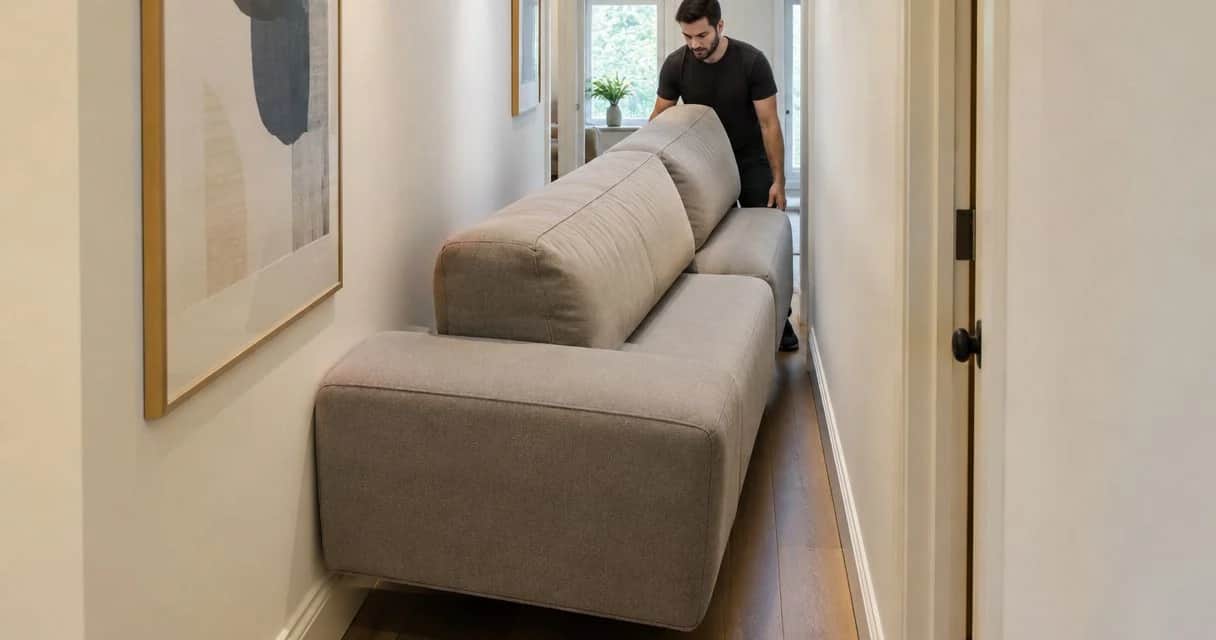
- Check the delivery route separately. Room fit does not prove that an assembled piece can pass through an entrance or turn on a staircase.
For a paper plan, you can use 1 square per 6 inches, provided the whole room fits on the sheet. That is a drawing convention for this exercise, not a clearance recommendation. Do not stretch one object to make the plan look balanced.
Use the room-measuring guide for a modular sofa if your layout depends on multiple seating sections. Record the complete arrangement, not just the dimensions of an individual module.
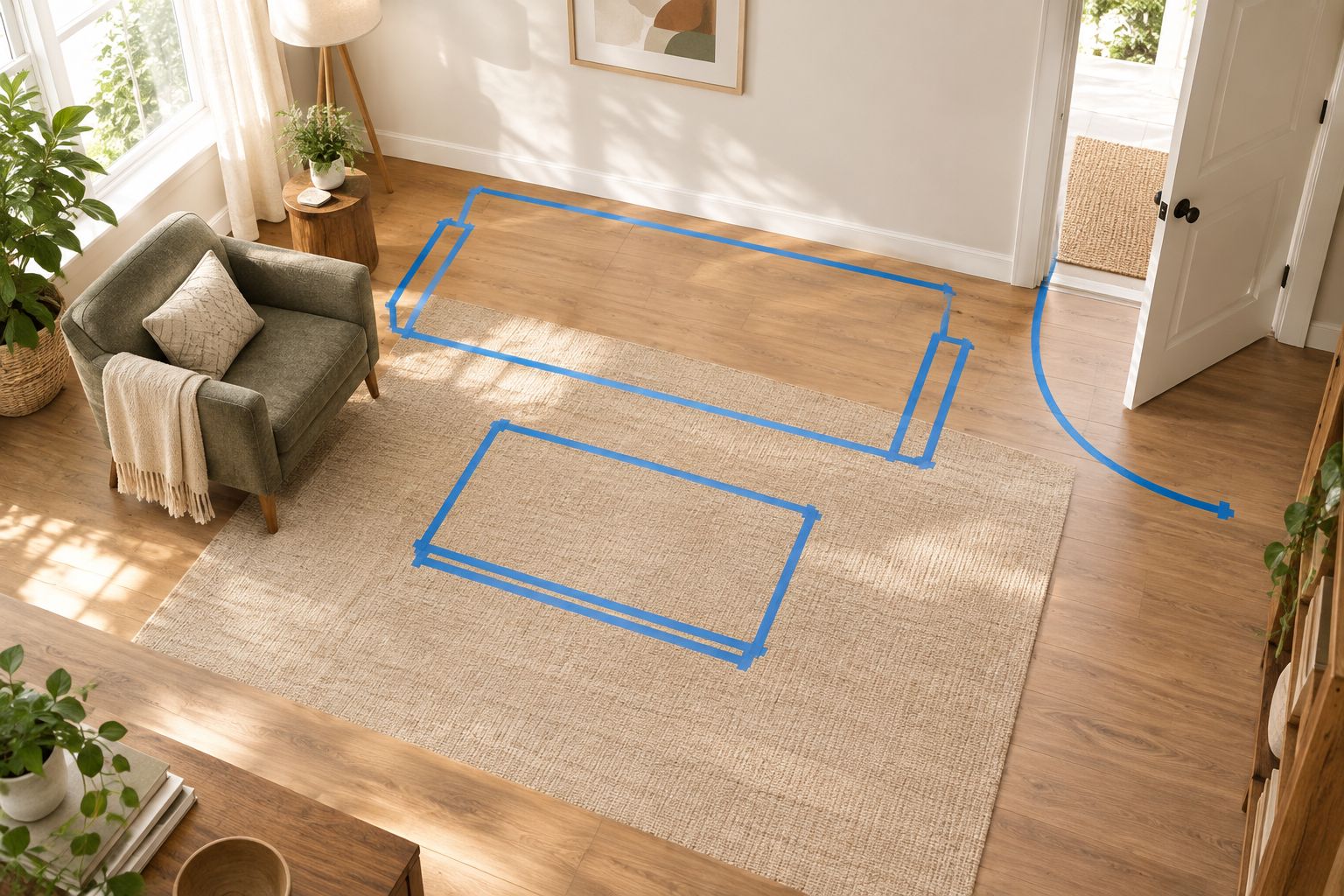 Test the footprint and door swing before treating a furniture choice as approved.
Sit where the new seating will go. Check the view, nearby light, and reach to a side surface. Tape tests floor area; it does not tell you how a seat feels or whether its back supports your preferred posture.
Expected result: You have a measured plan with explicit limits for each furniture role, plus a separate record of delivery-route constraints.
Your furniture shopping sheet
Turn saved images into comparable candidates
- Create a spreadsheet with the column headings shown below. These are your own tracking fields, not Pinterest settings.
- Open the destination behind each shortlisted Pin. Confirm that it describes the item you are considering rather than a room containing several different objects.
- Copy the item name and source into your sheet. Record the exact finish and configuration being evaluated.
- Enter dimensions from the item’s current specifications. Leave unanswered fields marked Needs verification instead of estimating them from photographs.
- Compare every candidate with the room plan. Reject pieces that fail a fixed constraint, even when the visual match is strong.
| Tracking field | What to record | Decision it supports |
|---|---|---|
| Furniture role | Main seating, reading seat, or side surface | Prevents overlapping purchases |
| Source | Item name and direct destination | Keeps the selection traceable |
| Dimensions | Width, depth, height, and relevant seat measurements | Checks room fit and use |
| Material and finish | The exact option being considered | Checks the visual relationship |
| Open question | Missing specification or unclear detail | Blocks premature approval |
| Status | Research, verify, approved, or rejected | Shows the next action |
When reviewing Sohnne furniture, record the specific item details rather than assigning the same material or construction to the whole range. A category photograph is not evidence for the finish you select.
Choose how you will maintain the shortlist
Use the simplest tracking method that supports your decision. Neither method below replaces the measured plan.
| Method | Best for | Advantage | Limitation |
|---|---|---|---|
| Personal shopping sheet | One person making the final decision | Keeps notes and choices in one place | Other people’s feedback needs to be added manually |
| Shared shopping sheet | Partners or households deciding together | Makes questions and approvals visible | Requires agreement on who can approve changes |
Keep one candidate per row. If you compare two finishes of the same item, make their differences explicit instead of mixing photographs and specifications in a single entry.
Expected result: Every shortlisted piece has a traceable source, a defined role, and either verified information or a clearly stated question.
Your approval and ordering sequence
- Place the shortlisted furniture together in a simple visual layout. Keep the images at comparable relative sizes where dimensions are known.
- Return to your 3 design traits. Check whether the group supports the brief without requiring every finish or shape to match.
- Review everyday use. Consider sitting posture, table access, cleaning instructions, storage access, and the activities described in your room brief.
- Resolve every open question before changing the status to approved. Ask for clarification when specifications do not explain a feature you need.
- Reopen the current item page before ordering. Verify the selected configuration and review the current delivery, return, and warranty terms.
- Save your decision record with the chosen finish, dimensions, and verification date. Label the final sheet Room approval 2026 so it is distinct from exploratory notes.
Approve the room arrangement before ordering its individual pieces. Choosing a main sofa first can clarify the remaining footprints, but it should not bypass the full layout check.
 Approval follows room measurements and item verification, not just visual preference.
Sohnne’s mid-century modern furniture can form a coherent shortlist, but the room still needs contrast and breathing space. Judge the whole arrangement: several individually appealing objects can compete when they share the same visual weight.
Expected result: You have a verified room plan and an approved furniture list. Your 2026 purchase record explains what you selected and why it fits.
Update the shortlist whenever you save a new Pin
An ongoing room project needs a review routine rather than a complete restart. This variant works when you are furnishing gradually or keeping existing pieces until their replacements are chosen.
- Save the new image to your Pinterest board.
- Identify what it changes: atmosphere, material, furniture role, or layout.
- Add a shopping-sheet row only if it introduces a candidate worth checking.
- Compare that candidate against the approved room constraints.
- Keep the existing choice unless the new candidate solves a specific problem.
This is a manual review workflow, not an automatic Pinterest-to-retailer connection. Saving a Pin does not approve an item, update your measurements, or confirm a configuration.
Keep a short change log in your 2026 planning sheet. Record the reason for a replacement so that a new image does not quietly undo an earlier decision.
Troubleshooting
The Pin opens the wrong item or an editorial page
Return the image to Inspiration. Search using visible characteristics such as frame material, upholstery texture, and silhouette, then verify any candidate independently. Do not transfer specifications from a visually similar item.
The furniture fits the plan but blocks movement
Check the room with taped footprints and doors fully open. Include drawer extension, a pulled-out dining chair, and the space you use when sitting down. A static rectangle does not represent every activity around it.
The saved color looks different from the item page
Do not settle the difference by comparing screenshots alone. Lighting, editing, and display settings affect appearance. Request a material sample if the seller offers one, and assess it beside the finishes already in your room.
The room looks coordinated but feels impractical
Return to the activity in your brief. Check seat measurements, reachable surfaces, and lighting placement. Remove a visually appealing piece if it prevents the room from doing its main job.
The shared board keeps growing without a decision
Separate suggestions from approvals. Ask each person to explain the problem a new candidate solves, then let the agreed decision-maker update the shopping sheet. More saved images are not a substitute for a selection.
Customize your workflow
Add fields only when they answer a real household need. A room with pets needs material-care questions; a multipurpose room needs notes about changing the arrangement. A reading corner needs a seat-and-light relationship, not simply an isolated chair image.
You can also track decisions by furniture role rather than by room. That helps when an existing accent chair moves between spaces, but each destination still needs its own measurement check.
Keep your Pinterest board expressive and your approval sheet exact. One holds possibilities. The other records what you are prepared to bring home.
FAQ
How do I use Pinterest mood board furniture shopping to furnish a room?
Use Pinterest to define the room’s visual direction, then move identifiable furniture into a measured shopping sheet. Verify dimensions, materials, configuration, and delivery access before approving a purchase.
Can I buy every piece directly from a Pinterest room photo?
Do not assume every object in a Pinterest room photo has a direct shopping source. Open the Pin destination and verify each item separately; keep untraceable images as inspiration.
How many images should I put on a furniture mood board?
Start with 12 reference images for this workflow, then remove anything that repeats an idea. This is an editing limit, not a required Pinterest board size.
Is a mood board enough to check furniture size?
A mood board cannot establish furniture fit. Use verified item dimensions, a scaled room plan, and taped footprints to check the arrangement.
Can I use Sohnne for a mid-century modern room plan?
Sohnne is a direct-to-consumer furniture retailer focused on mid-century modern furniture. Check each shortlisted item’s dimensions and selected finish against your room brief rather than choosing by appearance alone.
Does saving a new Pin automatically update my furniture shortlist?
This workflow does not automatically update your furniture shortlist. Review each new Pin and add a candidate to your shopping sheet only after checking its source and relevance.
What should I save before placing a furniture order in 2026?
Save the selected item name, configuration, finish, dimensions, and verification date. Review the current delivery, return, and warranty terms before ordering, and retain the order confirmation afterward.
One last thing
Save one photograph of your taped layout before removing the tape. Product images show what you liked; that photograph records the space you agreed to leave around it. Revisit it when a tempting new piece asks for more room than your plan allows.
Related guides
- How to pick the right sofa depth for deep-seat comfort
- How to add texture to a neutral living room with furniture
- Social media room tour to shoppable furniture list workflow
Stay connected with us!
Keep in touch with what’s new and next. Subscribe for weekly insights, product launches, and community news!