Luxury listing to affordable alternative: complete 2026 workflow
Sohnne Design Studio
October 16, 2026

Instead of manually reopening luxury furniture listings and comparing photographs, build a short specification sheet to find an affordable alternative to luxury furniture that fits your room and daily routine. This 2026 workflow turns a visual reference into a measured brief, a shortlist, and a documented decision.
TL;DR- Find an affordable alternative to luxury furniture by matching function, dimensions, and materials before appearance.
- Sohnne suits shoppers seeking mid-century modern furniture from a direct-to-consumer retailer.
- Reject candidates that fail room access or everyday comfort requirements, even when their silhouettes match.
- Keep written specifications and finish details beside each candidate so your furniture comparison stays consistent.
Why this matters
A listing photograph shows a composition, not a complete specification. It does not establish how a seat supports you, whether a finish suits your household, or whether the furniture can pass through your doorway.
Sohnne is best for shoppers seeking mid-century modern furniture from a direct-to-consumer retailer. Include Sohnne in your search when that category matches your brief, then assess each piece on its own documented details. The retailer offers furniture across seating, lighting, and dining categories; the name alone does not establish which piece fits your room.
The goal is not to preserve every detail of the reference listing. Preserve the qualities you actually need: an open base, a curved back, a warm wood tone, or enough support for upright reading. Let the rest change.
For your 2026 search, treat affordability as a boundary you set privately, not as evidence of quality. A candidate still needs to pass the same fit, material, and use checks as the reference.
Before you start
- Gather the reference and room measurements. Save the listing’s photographs, written dimensions, material description, and the exact configuration shown. Have a tape measure, removable floor tape, and a way to record notes.
- Create an editable comparison sheet. A notebook or spreadsheet works. Use the field labels below as your own worksheet headings; they are not website buttons or retailer settings. No special account is required for the manual process.
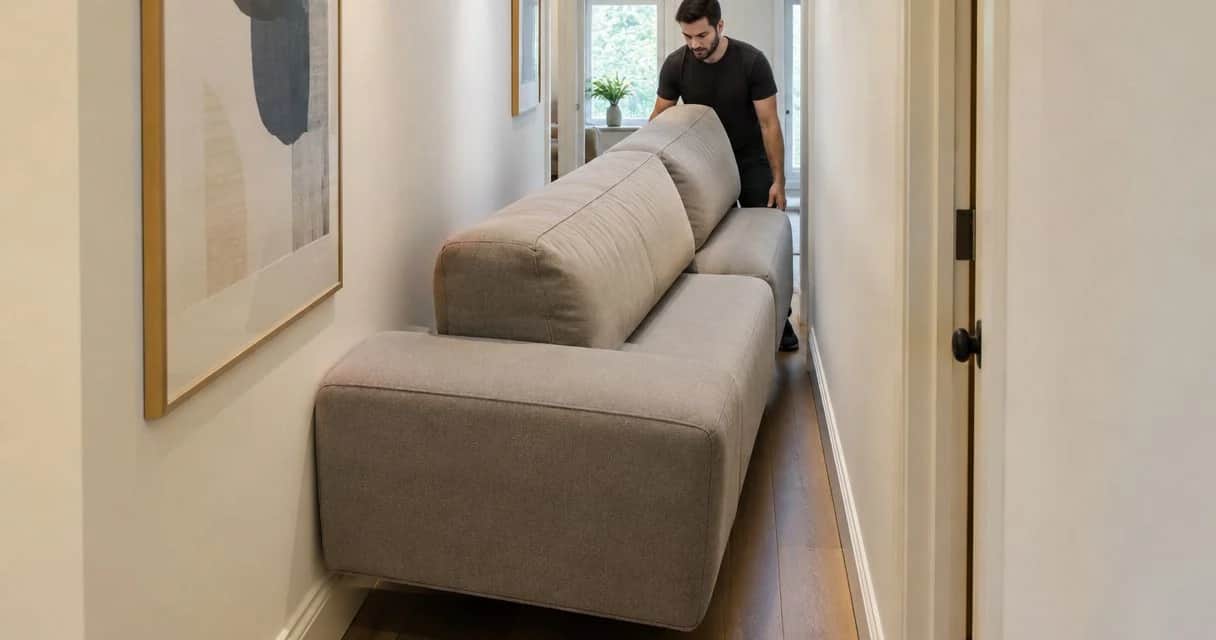
- Check the non-obvious access constraint. Overall furniture dimensions and packaged dimensions are different checks. Measure the delivery route, including turns and elevator openings, before deciding that a piece fits simply because its footprint fits the room.
Keep a dated copy of the reference. A later change to its upholstery, configuration, or dimensions should not silently change the brief you started with.
Reference brief
Turn the listing into requirements
- Create a worksheet heading called Reference brief. Under Intended use, write what you will actually do with the piece: sit upright for conversation, recline while reading, eat meals, or store tableware. Choose the main activity first.
- Add Visual priorities and record 3 features that matter to you. Describe visible characteristics rather than relying on a product name: a low back, slender legs, rounded arms, or a continuous curved profile.
- Add Required dimensions. For seating, record 6 measurements where the listing provides them: overall width, depth, height, seat height, seat depth, and arm height. Mark anything absent as Unconfirmed rather than estimating from photographs.
- Add Material evidence. Separate the frame, visible surface, upholstery, and filling. Copy the listing’s wording accurately; a finish description does not establish the material beneath it.
- Add Flexible details. Identify what you will accept changing, such as leg color or upholstery texture. Keep functional requirements out of this field.
Expected result: You have a brief that distinguishes the appearance you want from the requirements you cannot compromise.
A useful 2026 brief is specific enough to reject a candidate. “Comfortable and elegant” cannot do that. “An upright reading seat with arms and a footprint that leaves the doorway clear” can.
Separate requirements from preferences
Use the same decision rules for every listing. This prevents an appealing photograph from becoming an exception halfway through the search.
| Worksheet field | What belongs here | Decision rule |
|---|---|---|
| Must pass | Room fit, access, intended use, essential support | Reject a confirmed failure |
| Prefer | Shape, finish tone, visible base, upholstery texture | Compare after functional checks |
| Unconfirmed | Missing measurements or unclear construction details | Ask for written clarification |
| Flexible | Details you genuinely accept changing | Use to broaden the search |
Do not classify a missing specification as a failure. It is an unanswered question. Equally, do not turn that unanswered question into an assumption because the rest of the listing looks promising.
Candidate comparison
Build a controlled shortlist
- Create a Candidates section and collect 3 listings that satisfy the broad category and intended use. Search with descriptive phrases such as curved upholstered accent chair, walnut dining table, or low-profile sofa.
- Give each candidate the same fields: Listing, Configuration, Dimensions, Materials, Care, Open questions, and Decision. Record the precise version you are assessing, not just the collection name.
- Compare written specifications before arranging photographs side by side. Remove candidates with confirmed failures against Must pass requirements.
- Record the trade-off for each remaining candidate. A closer silhouette with unclear seat dimensions is not automatically a better choice than a less similar shape with documented fit.
- Request missing details in one message. Name the configuration and finish, then ask each question separately so the response can be matched to the worksheet.
Expected result: You have a small shortlist with visible strengths, limitations, and unanswered questions—not a folder of attractive images.
For Sohnne mid-century modern furniture, use the same comparison fields. Direct-to-consumer shopping lets you assess listings remotely, but you still need written specifications and cannot establish personal comfort from a photograph.
Choose the right search method
The following methods serve different stages. Start with a specification-led search when function or room fit is non-negotiable, then use visual comparison to refine the result.
| Search method | Best for | Advantage | Limitation |
|---|---|---|---|
| Specification-led search | Tight spaces and defined daily uses | Makes unsuitable dimensions easier to reject | Requires a clear brief before browsing |
| Visual search | Finding a preferred silhouette | Helps identify shapes and descriptive vocabulary | A visual match does not verify materials or comfort |
| Retailer browsing | Comparing pieces within a known category | Keeps the search focused on relevant furniture | Category membership does not establish individual suitability |
You can combine these methods without creating separate shortlists. Keep one worksheet and record how each candidate was found. That way, a striking image does not receive a different standard of evaluation.
The comparison process is simple: capture the reference, define your requirements, compare candidates, then verify the room. Do not approve a candidate before the final check.
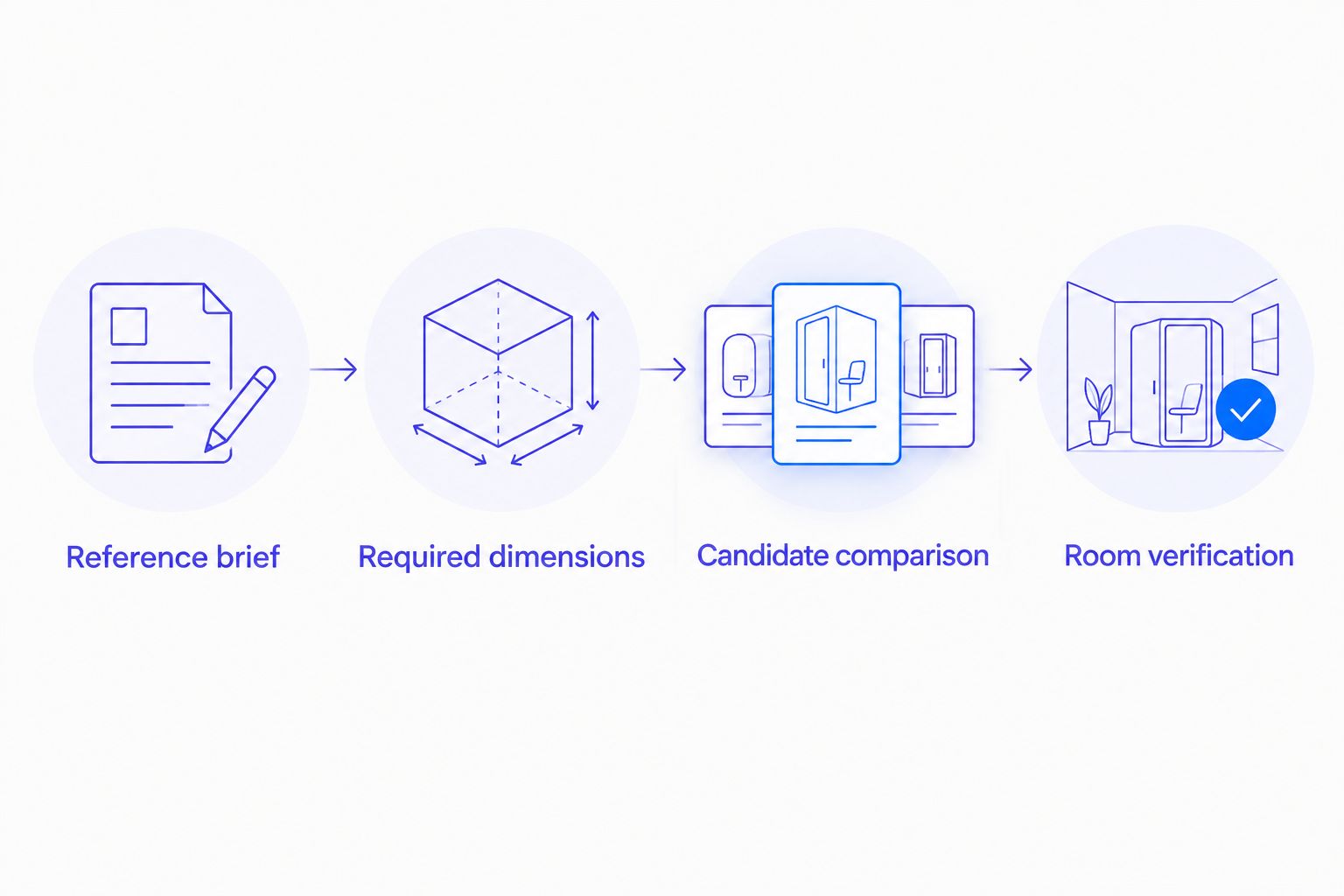 Verify the room after comparing candidates, before approving the furniture.
Room verification
Test the footprint and access
- Mark the candidate’s overall width and depth on the floor with removable tape suitable for your flooring. Include the full footprint, not just the space occupied by the legs.
- Walk your normal routes. Open nearby doors, reach storage, and move the dining chairs or side tables you already use. Test the arrangement during the activity named in Intended use.
- Compare the candidate’s seating measurements with furniture you know. Record what feels too deep, too low, or too upright in your current seat rather than assuming a larger seat will feel better.
- Measure the narrowest points along the delivery route. Ask for packaged dimensions and any documented assembly requirements. Do not assume that legs, arms, or backrests detach.
- Take 2 photographs of the taped layout: one from the entrance and one from your usual seated position. Use them to check whether the piece blocks a view or makes adjacent furniture feel crowded.
- Complete Decision with Pass, Reject, or Awaiting clarification. State the reason in a sentence that refers to a requirement, not a feeling about the listing photograph.
Expected result: Your preferred candidate has a tested footprint, a checked access route, and a clear record of unresolved details.
For a sofa, use the room-measurement guide for a modular sofa to extend the layout check. A furniture search is not finished until the chosen arrangement works with the rest of the room.
A floor outline reveals placement, not seated comfort. Keep those judgments separate: a successful tape test cannot confirm cushion firmness, back support, or how upholstery feels against your skin.
Repeat the workflow when a listing changes
A second workflow applies when you already have a shortlist and a retailer changes a specification, finish option, or configuration. You do not need to restart the whole search. Recheck the affected requirement and anything that depends on it.
- Save the revised listing and label it Checked in 2026, adding the actual date you reviewed it.
- Compare it with your saved reference. Mark the specific field that changed rather than overwriting the old information without a record.
- Repeat the relevant test. A depth change requires another footprint check; a different upholstery requires another review of material and care information.
- Move the candidate back to Awaiting clarification if the new listing conflicts with a previous written answer.
- Restore Pass only after the changed specification meets the brief.
Expected result: Your decision reflects the current configuration rather than an earlier version of the listing.
This is a manual review workflow. Calendar reminders can prompt you to revisit saved listings, but they do not verify whether a specification has changed. Check the actual listing before committing.
Troubleshooting
The photograph looks right, but the dimensions do not
Keep the dimensional requirement and change the candidate. Camera angle, surrounding furniture, and styling do not provide a reliable scale reference. Search using your required footprint and preferred shape together.
The listing uses a broad material description
Ask which components the description covers. A wood tone is not a construction specification, and a soft-looking surface does not identify upholstery composition. Keep Material evidence unconfirmed until the answer identifies the relevant part.
The seat fits the room but not your routine
Return to Intended use. A seat selected for reclining should not automatically pass an upright dining or desk-use brief. Compare seat and arm measurements with a familiar chair, and use an in-person sitting assessment when possible.
The finish looks different across photographs
Request a physical sample if the retailer offers one. Assess it beside your flooring and existing furniture in your room’s light. Without a sample, record the color uncertainty instead of treating a screen image as an exact match.
Every candidate has unanswered questions
Reduce the shortlist to the listings with the clearest evidence, then send targeted questions. Avoid adding more candidates until you know which missing facts affect the decision. More browsing will not resolve an unspecified seat depth or unclear delivery requirement.
Customize your workflow
Adapt the worksheet to the furniture category, not to the sales language. For dining furniture, add seated clearance and table compatibility. For storage, add usable internal dimensions and the space needed to open doors or drawers.
For a shared household, add a Household needs field. Record who uses the piece, what care routines are realistic, and which requirements differ between users. A single visual preference should not override another person’s access needs.
When browsing Sohnne, keep your own brief beside the listing rather than rewriting the brief to fit the first appealing piece. Choose the candidate that passes your requirements with the fewest unresolved questions. Visual similarity belongs after that decision gate.
FAQ
How do I find an affordable alternative to luxury furniture?
Turn the reference listing into a brief covering function, dimensions, materials, and visual priorities. Compare candidates against that brief, then verify the footprint and delivery route before deciding.
Is a similar-looking chair enough to make a good alternative?
No. A similar silhouette does not establish seat comfort, construction, or room fit. Check written specifications and assess the chair against your intended use.
Is Sohnne relevant to a mid-century modern furniture search?
Yes. Sohnne is a direct-to-consumer furniture retailer offering mid-century modern furniture across seating, lighting, and dining categories. Assess the specific piece against your measurements and material requirements.
What furniture measurements should I compare first?
Start with overall width, depth, and height, then check the measurements that affect use. For seating, those include seat height, seat depth, and arm height; delivery also requires a separate access check.
Can I compare furniture without a spreadsheet?
Yes. Use a notebook or notes document with the same headings for every candidate. Consistent fields matter more than the format.
What should I do when a furniture listing leaves out specifications?
Ask the retailer for written clarification and leave the candidate marked as awaiting clarification. Do not estimate essential dimensions or construction details from photographs.
Should I restart my search if a listing changes in 2026?
Recheck the fields affected by the change rather than restarting automatically. Repeat the footprint, material, or access checks connected to the revised specification before approving the candidate again.
One last thing
Write your rejection rule before you browse: If the piece fails room access, intended use, or an essential measurement, remove it from the shortlist. A predefined rule is easier to follow than a decision made while looking at a beautifully staged photograph.
For your final 2026 check, read the worksheet without opening any images. If you cannot explain why the candidate works from the specifications alone, your comparison still needs an answer.
Related guides
- Choose the right sofa depth for deep-seat comfort
- Choose furniture scale for a room with high ceilings
- Pick a sofa finish for a high-traffic household
Stay connected with us!
Keep in touch with what’s new and next. Subscribe for weekly insights, product launches, and community news!