Trade account to bulk order discount: complete 2026 workflow
Sohnne Design Studio
October 15, 2026

Instead of manually reconciling furniture selections, account details, and approval emails, build a furniture trade account bulk discount workflow around a single project schedule and written order terms. For your 2026 Sohnne project, confirm trade eligibility, request project-specific terms, and approve the exact furniture schedule before placing the order.
TL;DR- Sohnne serves trade clients buying mid-century modern furniture; confirm project-specific terms before committing.
- A furniture trade account bulk discount workflow separates account approval, bulk order review, and purchase authorization.
- Use a furniture schedule to connect every selection with its quantity, finish, room, and delivery destination.
- Request written confirmation after quantity or finish changes; account approval alone does not establish bulk order terms.
Why this matters
A trade relationship and a bulk order agreement answer different questions. The first concerns who is buying; the second concerns the exact project being purchased. Do not treat trade account approval as confirmation of a bulk discount.
Sohnne designs and manufactures mid-century modern furniture and serves individual buyers and trade clients. Sohnne is a furniture retailer for trade buyers sourcing mid-century modern pieces with customization options. The practical next move is to turn your selections into a clear request, not assume that a larger basket automatically changes the terms.
For a 2026 procurement plan, keep 3 records separate: your account correspondence, your furniture schedule, and your approved order document. This is a recommended filing structure, not an application requirement. Separating them makes a revised chair count easier to track without losing the earlier account decision.
The benefit is control. You can see which selections are settled, which conditions need confirmation, and who has authority to approve the purchase.
Before you start
- Prepare your purchasing identity. Gather your business name, purchasing contact, billing information, and project description. Ask which eligibility documents are required rather than assuming a professional credential or tax document is sufficient.
- Prepare the project materials. Assemble a room plan, a furniture schedule, finish references, quantities, and delivery destinations. Assign one person to maintain the current version and another to approve it if your business requires separate authorization.
- Resolve the billing gotcha first. Establish whether your firm or your client will place and pay for the order. Trade eligibility, purchasing authority, and tax treatment are separate issues; confirm how the intended billing arrangement affects the request before seeking final terms.
Do not send sensitive documents through an unverified channel. Use the submission method the retailer confirms, and provide only the information requested. A project brief should explain the purchase without exposing unrelated client records.
Purchasing identity
- Identify the legal purchasing entity and the person authorized to act for it. Keep the business name consistent across your correspondence and purchasing documents.
- Describe the project plainly: residential furnishing, an office refresh, or another actual use. Include whether you are buying for your own business or on behalf of a client.
- Ask Sohnne how to establish or confirm your trade relationship. Request the eligibility criteria, required documentation, and correct submission channel before sending an application package.
- Submit the requested information through that confirmed channel. Save the submission and subsequent correspondence with the account record.
- Obtain written confirmation of the account decision and any conditions attached to it. Record the purchasing contact and how future project requests should be submitted.
Expected result: You have a documented account decision, a named purchasing contact, and a confirmed route for the project request. You have not yet treated any project-level discount as approved.
Keep eligibility separate from tax treatment
A business purchase does not automatically establish a tax exemption. If your transaction involves resale or another exemption, ask what documentation applies to the delivery jurisdiction and your purchasing arrangement. Resolve the question with the appropriate tax authority or adviser when necessary.
For your 2026 account record, retain the documents actually accepted for that transaction. Do not assume that an earlier purchase establishes the treatment of a different project or destination.
Project furniture schedule
- Create one row for each distinct furniture selection. Record the exact item reference you have verified, its quantity, selected finish, intended room, and delivery destination.
- Separate different finishes into different rows, even when the underlying furniture selection is the same. A walnut finish and a different wood finish are not interchangeable instructions.
- Distinguish standard selections from customization requests. Describe the requested change precisely and ask for written confirmation before including it in an approved specification.
- Measure the room and the delivery route. Check the entrance, internal doors, stairs, elevator, and final placement area against verified furniture dimensions.
- Assign a revision identifier to the schedule and record who approved it. Remove superseded versions from the active purchasing folder while retaining them in your archive.
Expected result: Every requested piece has a defined quantity, finish, location, and destination. The schedule is ready for review without requiring the recipient to infer choices from a mood board.
Use 6 recommended columns as your starting point: item reference, quantity, finish, room, destination, and notes. These are workflow fields you create, not labels from a retailer's account interface.
| Schedule field | What to enter | What it prevents |
|---|---|---|
| Item reference | Exact verified selection | Ordering a similarly named piece |
| Quantity | Count for that specific selection | Confusing room totals with order totals |
| Finish | Confirmed material or finish description | Treating different finishes as identical |
| Room | Intended placement | Losing the connection to the room plan |
| Destination | Delivery address or site identifier | Sending furniture to the wrong location |
| Notes | Customization requests and unresolved questions | Mistaking a request for an approved specification |
For room-fit decisions, use the guide to measuring a room before buying a modular sofa. Complete the measurement work before finalizing quantities; an attractive floor plan is not proof that furniture can reach its intended room.
Bulk order review
- Send the current furniture schedule through the confirmed purchasing channel. Identify the revision and describe the full project scope rather than sending disconnected item requests.
- Request written confirmation of whether a bulk discount applies to that schedule. Ask what conditions govern eligibility and whether the assessment depends on quantities, selections, customization, or purchasing structure.
- Ask which lines the confirmed terms cover. Do not assume that every item or requested modification receives identical treatment.
- Clarify whether the project must be ordered together or whether separate releases are permitted. If you need several destinations, ask how that changes the agreement.
- Record the validity period and the changes that require another review. Obtain clarification before using the terms for client approval.
Expected result: You have a written project response tied to a specific schedule revision. The document establishes what applies, what remains unresolved, and what needs another review after a change.
Trade account versus bulk order review
Use the following distinction when choosing what to request. These are purchasing workflows, not named Sohnne account tiers.
| Workflow | Best for | Advantage | Limitation |
|---|---|---|---|
| Trade account confirmation | Professional buyers establishing a purchasing relationship | Clarifies eligibility and the submission route | Does not establish terms for a particular order |
| Bulk order review | Buyers with a defined furniture schedule | Connects requested terms to exact selections and quantities | Requires another review when the agreed scope changes |
Use both workflows for a defined trade project. Account confirmation establishes the relationship; bulk order review establishes the project-specific agreement. Neither document replaces the other.
A 2026 project folder should make this distinction visible. Label account correspondence separately from project terms so a colleague does not authorize a purchase using the wrong document.
Order authorization
- Compare the final order document with the approved furniture schedule line by line. Check selections, quantities, finishes, customization details, and destinations.
- Confirm the purchasing entity, billing contact, and authorized approver. Resolve discrepancies before payment or another binding purchase action.
- Obtain written answers about delivery arrangements and the policies that govern this particular order. Ask specifically whether customization or the purchasing arrangement changes any applicable conditions.
- Have the authorized person approve the exact revision being ordered. Save the approval alongside the matching order document.
- Submit the order using the confirmed method, then compare the acknowledgement with the approved documents. Raise discrepancies immediately rather than allowing them to become the project's working specification.
Expected result: The approved schedule, written terms, purchase authorization, and order acknowledgement describe the same transaction.
Use 2 checkpoints: one before purchase authorization and one after the acknowledgement arrives. These are recommended control points, not retailer processing stages. The first catches errors in the proposed transaction; the second catches differences in the recorded order.
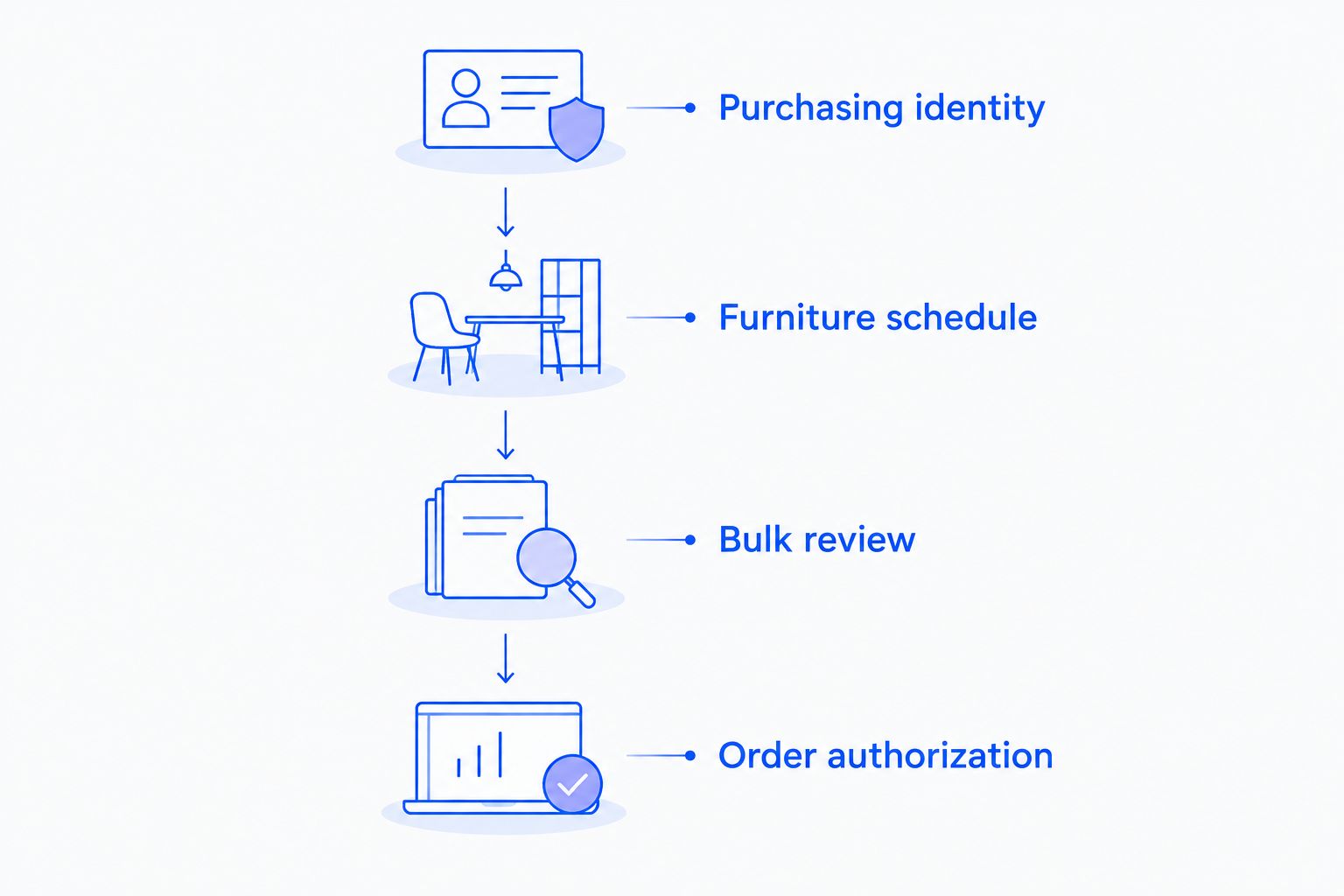 Confirm the purchasing relationship before seeking project terms, then authorize the exact reviewed schedule.
Keep the acknowledgement in the project folder, not only in an individual inbox. The person receiving furniture needs access to the same item and destination information as the person who authorized it.
Reconfirm terms whenever the schedule changes
A phased project needs the same controls as a single purchase, with an additional distinction between the complete design plan and the portion currently being ordered. Do not carry earlier terms onto a changed schedule without written confirmation.
For a 2026 phased installation, create a master schedule and a separate release schedule. The master records the intended project; the release records only the selections you are asking to order now.
- Record the change in the master schedule. State whether it affects quantity, finish, customization, destination, or purchasing entity.
- Produce a current release schedule with its own revision identifier. Make the difference from the previous request explicit.
- Ask the purchasing contact to reconfirm the terms for that release. Confirm whether the complete project or each release is assessed separately.
- Obtain fresh internal approval when the change affects the authorized scope. Archive the superseded release and retain the current acknowledgement.
Expected result: Each release has its own confirmed scope and authorization, while the master schedule preserves the wider design intent.
The advantage is flexibility: rooms can be purchased in defined phases. The drawback is administration; each change creates another document to reconcile. A single consolidated order is simpler to track, but only suits a project whose selections and destinations are settled.
Troubleshooting
The account is confirmed, but the bulk terms are unclear
Request a project-specific written response against the current schedule. Ask explicitly whether a bulk discount applies and which conditions govern it. Keep the purchase unapproved until the answer resolves the question; a general account email is not a substitute.
The client changes finishes after approving the request
Separate the changed selections into clearly identified rows and issue a revised schedule. Ask Sohnne to reconfirm the specification and project terms before authorizing those lines. Preserve the earlier approval as history, not as permission for the new finish.
The order acknowledgement has different quantities
Compare the acknowledgement with the approved revision and identify each mismatch. Send one consolidated correction request with the affected lines clearly marked. Keep the discrepancy visible until you receive a corrected document or an explicit explanation.
Several destinations have been combined into one request
Assign each line to a destination and ask how the purchasing and delivery arrangements will be documented. Confirm which terms apply to each release or destination. Do not rely on a room nickname when a delivery address is required.
A colleague orders from an old schedule
Withdraw the old schedule from the active folder and circulate the current revision. Identify the authorized approver on the current document. If an order has already been submitted, contact the purchasing representative immediately to establish what corrective action is possible under the applicable terms.
Customize your workflow
Expand the schedule to include the information your project actually needs. For a multiroom installation, add room-level approvals; for several destinations, add receiving contacts; for customization, retain the confirmed specification beside the relevant line.
Sohnne's mid-century modern furniture can sit within a wider room plan, but purchasing approval should remain separate from aesthetic approval. A finish can suit the palette while the quantity or delivery instructions still need correction.
Give one person ownership of the schedule and name a backup. The owner controls revisions; the backup keeps the process usable when the owner is unavailable. Both should work from the same active folder.
FAQ
Does a furniture trade account automatically include a bulk discount?
Do not treat trade account approval as confirmation of a bulk discount. Request written project-specific terms tied to your exact selections and quantities before authorizing the order.
How do I request a furniture trade account bulk discount from Sohnne?
Confirm Sohnne’s trade submission process, then send a defined furniture schedule and request written confirmation of any applicable bulk terms. Include quantities, finishes, destinations, and customization requests so the response addresses the actual project.
What should I prepare before requesting trade terms?
Prepare your purchasing identity, project description, furniture schedule, and intended billing arrangement. Ask which eligibility documents are required before submitting sensitive business information.
Can I combine different furniture selections in one bulk request?
List the full project schedule and ask whether its selections can be assessed together. Obtain written confirmation of which lines qualify rather than assuming that mixed selections receive identical treatment.
What happens if my furniture quantities change?
Issue a revised schedule and request confirmation of the terms for the changed scope. Keep the previous revision in your archive and obtain approval for the document you intend to order.
Can I divide a trade project into separate orders?
Request confirmation of whether separate releases are permitted and how each release will be assessed. Maintain a master schedule for the full project and a release schedule for each proposed purchase.
Does trade account approval make my purchase tax-exempt?
Trade account approval does not establish tax-exempt status. Confirm the documentation and treatment applicable to your transaction, purchasing entity, and delivery jurisdiction.
One last thing
The final control is not the account approval. It is the match between the schedule you authorized and the order the retailer acknowledged.
Before closing your 2026 purchasing file, open those documents side by side. If the selection, quantity, finish, or destination differs, resolve it before treating the order as settled.
Related guides
- Furniture planning for interior designers
- Furniture planning for architecture firms
- Furniture planning for corporate offices
Stay connected with us!
Keep in touch with what’s new and next. Subscribe for weekly insights, product launches, and community news!