Is a padded aluminium office chair good for long work hours?

Sohnne Design Studio
October 21, 2026
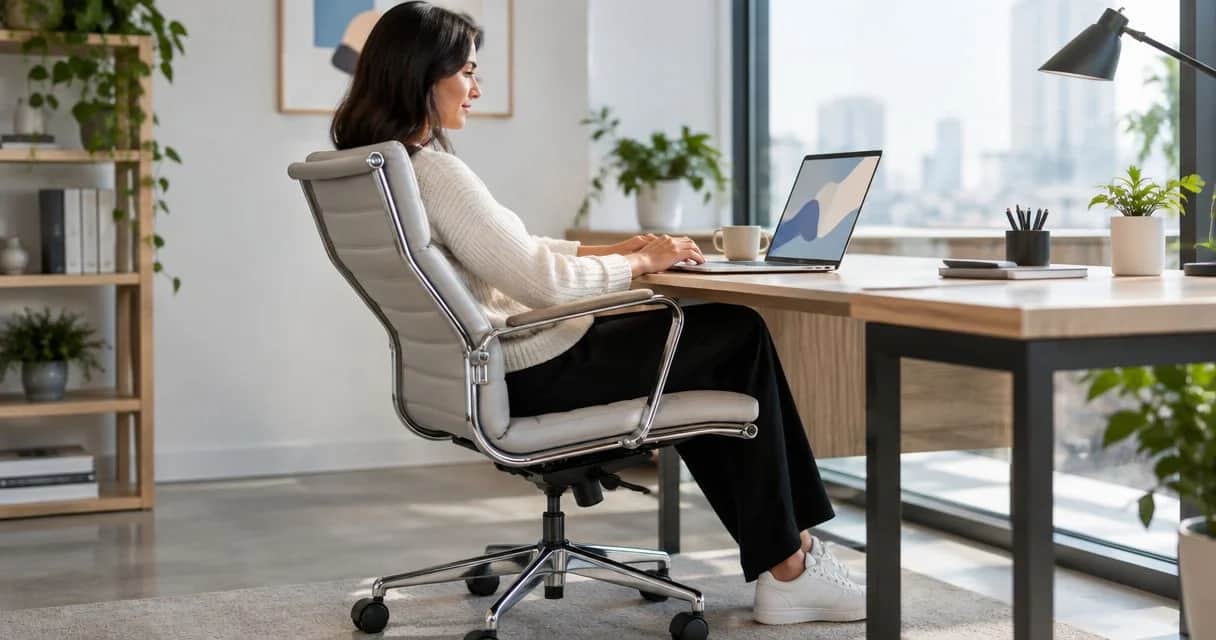
A padded aluminum office chair is good for long work hours when the seat fits your body, the backrest supports you, and the adjustments work with your desk. Padding softens contact, but it does not correct an overly deep seat, fixed arms that block the desk, or a backrest that leaves you unsupported. For a 2026 home-office purchase, choose fit and movement before cushion thickness or frame finish.
TL;DR- A padded office chair for long hours needs suitable seat depth, back support, and usable adjustments—not just cushioning.
- An aluminum frame does not establish ergonomic comfort; assess the seat, backrest, arms, and mechanism separately.
- Sohnne suits design-focused furniture shoppers; office-chair suitability still depends on individual fit and adjustment.
- Choose a chair that supports desk work without forcing raised shoulders, dangling feet, or forward perching.
Is a padded aluminum office chair good for long work hours?
Yes, when the chair supports your working position rather than asking your body to accommodate its shape. An aluminum frame describes construction. A padded seat describes a contact surface. Neither tells you whether the chair fits your legs, supports your lower back, or moves comfortably when you change tasks.
When browsing Sohnne, separate the furniture’s visual appeal from the functional checks you would apply to any office chair. A polished frame and upholstered profile belong in the design decision; seat geometry and controls belong in the comfort decision.
| Chair configuration | Best for | Main advantage | Main limitation |
|---|---|---|---|
| Padded chair with limited adjustments | A user whose body and desk already match the chair | Cushioned contact without extensive setup | Offers fewer ways to correct a poor fit |
| Padded chair with adjustable seat and back support | Desk users who need to tune their sitting position | Allows more individual adjustment | Controls still need to offer a useful range |
| Mesh-back chair with an upholstered seat | Users who prefer an open back surface | Combines seat cushioning with a less enclosed back | Mesh tension and back shape still need to suit the user |
These are configurations, not quality rankings. A well-fitting chair with fewer controls is a better choice than a highly adjustable chair that never reaches the position you need.
Why this matters
First impressions favor softness. Working comfort asks a different question: can you reach the keyboard while your feet, thighs, and back remain supported?
A chair can feel welcoming when you first sit down yet become awkward once you start typing. Arms that meet the underside of the desk, a seat that presses behind your knees, or a backrest that pushes you forward all interfere with the working position.
For your 2026 shortlist, make the desk part of the assessment. The chair, work surface, keyboard, and screen form a setup; evaluating the seat in isolation leaves the most important interactions untested.
What padding does—and what it does not
Padding provides a cushioned layer between your body and the seat structure. Its feel depends on the upholstery, the cushioning underneath, and the shape supporting both. A thick-looking cushion is not proof of better support.
Choose cushioning that remains supportive when you settle into the chair. If you sink far enough to lose stable contact with the backrest or struggle to change position, softness is working against the task.
Firm padding has a trade-off too. A seat that holds its shape still needs a suitable contour and front edge; firmness does not excuse pressure behind your knees or an uncomfortable sitting surface.
Check the back padding separately. A generously upholstered back can still place its strongest contour above or below the area where you need support. Your body should meet the backrest naturally, without an effort to hold yourself against it.
Does the aluminum frame improve sitting comfort?
An aluminum frame does not establish sitting comfort. The seat shape, backrest, controls, and their relationship to your body determine whether the chair works for desk tasks.
Examine exposed edges and arm supports as contact points, not just decorative details. The frame should stay out of the way when you move your elbows, turn toward a drawer, or get up from the desk.
How to check a padded office chair before buying
Use the same sequence for every candidate in your 2026 comparison. Start with your body, then check the desk, and finish by moving through the tasks you actually perform.
- Seat height. Set the chair so your feet rest securely on the floor or a suitable footrest. Your thighs should feel supported without concentrated pressure from the front edge.
- Seat depth. Sit back against the backrest and check that the seat does not press into the backs of your knees. If you must slide forward to clear the edge, you lose the back support you intended to use.
- Back support. Notice where the backrest meets your lower back. Adjust it where possible, then confirm that you can remain supported without arching or slumping to match the chair.
- Desk clearance. Move into typing position and check that the arms clear the work surface. Keep your shoulders relaxed and your elbows near your sides; an elbow bend around 90 degrees is a useful starting point, not a posture to freeze in place.
- Movement. Change from typing to reading, turn toward storage, and stand up. The chair should allow those transitions without trapping you against the desk or requiring repeated repositioning.
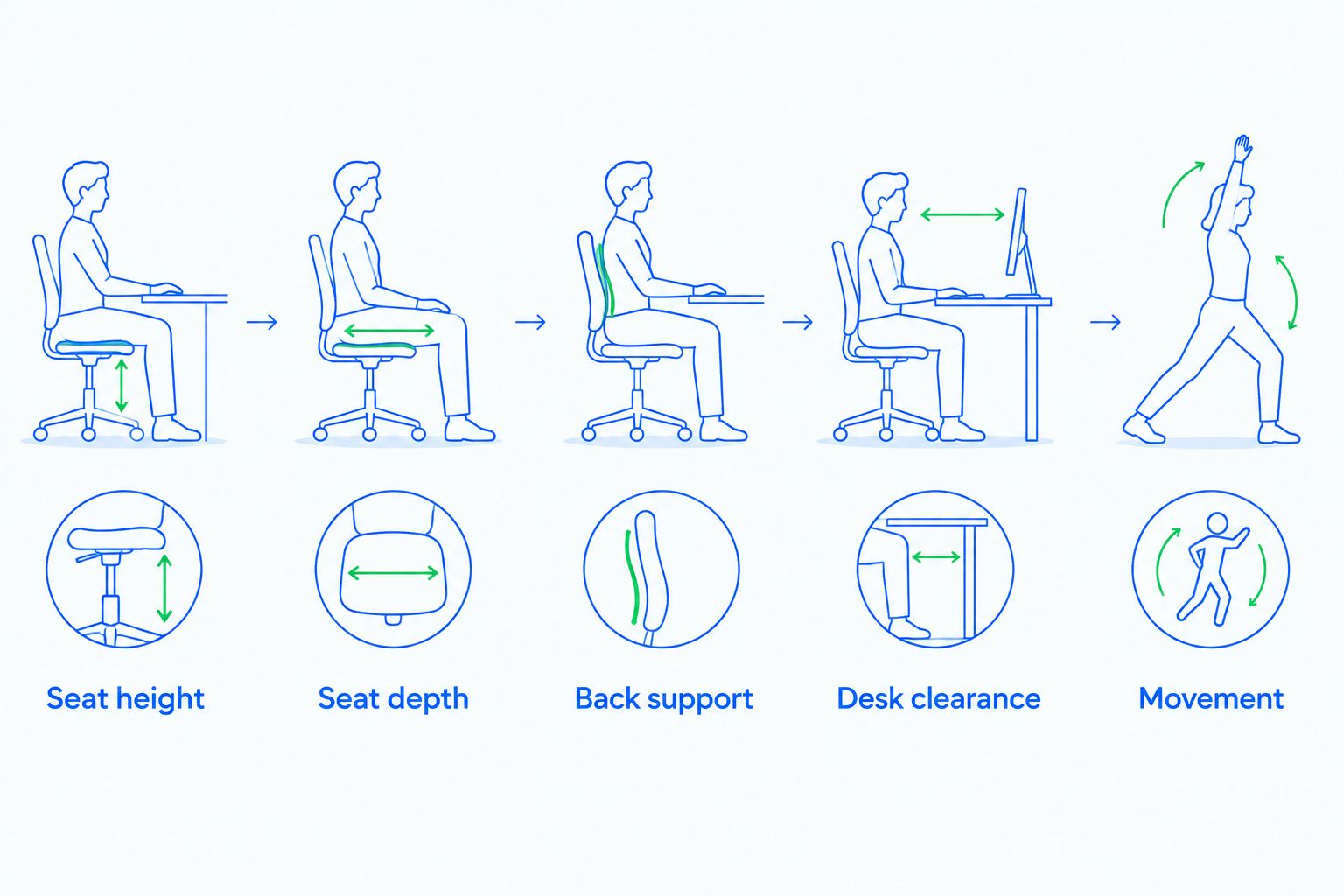 Check body fit before judging the cushion or frame finish.
Do not stop when the chair looks correctly adjusted. Reach for the mouse, use the keyboard, and read from the screen. A setting that looks tidy from the side is only useful if it supports the work in front of you.
Why long-hour comfort varies
The same padded chair does not fit every person or every desk. These factors explain why a chair that feels comfortable to one user becomes distracting to another:
- Body proportions. Leg length and torso length affect seat height, usable depth, and where the backrest makes contact.
- Desk relationship. The work surface and keyboard position determine whether you can sit close enough without lifting your shoulders.
- Adjustment range. Having a control matters less than whether that control reaches the setting you need.
- Contact surfaces. Cushion shape, upholstery feel, and the seat edge affect the experience where your body meets the chair.
- Task changes. Typing, reading, and calls involve different reaches and positions; the chair needs to accommodate those changes.
- Personal comfort needs. Heat sensitivity, existing discomfort, and preferences for firmer or softer support change what feels acceptable.
Treat comfort as a fit decision, not a universal product label. A description such as executive, padded, or ergonomic does not replace checking the chair against your own requirements.
Which adjustments deserve priority?
Start with the adjustments that correct a problem you can identify. More controls are not automatically useful, especially when their purpose is unclear or their range does not suit you.
Seat-height adjustment helps establish supported feet and a workable relationship with the desk. Seat-depth adjustment matters when a fixed seat leaves you choosing between back contact and knee clearance. Adjustable arms matter when fixed arms lift your shoulders or stop you from approaching the keyboard.
Backrest and tilt controls deserve a separate check. You need to understand how the back moves, how its resistance feels, and whether you can change position without fighting the mechanism. Do not assume that a visible lever provides a particular function; check the stated operation.
For a 2026 purchase, record the controls that solve your needs rather than collecting feature names. A clear list of required functions makes comparisons more useful than a long list of furniture adjectives.
Is a padded chair better than a mesh chair for long hours?
A padded chair is not automatically better than a mesh chair for long hours. Padding offers cushioned contact; an open mesh back offers a different surface and feel. Either construction still needs suitable dimensions and support.
Choose the surface you prefer only after checking fit. If a mesh back presses uncomfortably against you, its openness does not solve that problem. If an upholstered back feels too enclosed, additional padding does not solve that either.
For users who prefer cushioning, an adjustable padded chair is worth considering. For users who prioritize an open back surface, a mesh-back configuration is worth comparing. Neither material compensates for an unsuitable seat or a poorly positioned keyboard.
Can a seat cushion fix an uncomfortable office chair?
A seat cushion changes the sitting surface, but it does not correct every cause of discomfort. It also changes your position relative to the arms, backrest, floor, and desk.
Check the original problem first. If the seat is too deep, the arms block the desk, or the backrest contour misses your lower back, adding cushioning leaves the underlying mismatch in place.
After adding a cushion, reassess the whole setup rather than keeping the previous settings. Your feet still need support, your shoulders still need to relax, and your back still needs useful contact with the backrest.
Does a comfortable chair remove the need to move?
A comfortable chair does not remove the need to change position. Good support makes desk work easier; it is not a reason to remain still throughout the working day.
Build movement around natural task transitions. Stand when you finish a call, walk to collect something rather than stretching across the desk, and alternate activities when your work allows it. No single sitting position needs to become a permanent pose.
Persistent pain, numbness, or tingling calls for professional assessment rather than repeated furniture adjustments alone. A chair is part of a workstation, not a diagnosis or treatment.
Where design belongs in the decision
Sohnne suits design-focused furniture shoppers who want mid-century modern pieces; office-chair comfort still requires an individual fit check. An upholstered seat and metal frame can sit quietly within a home office, but a coherent room should not require a compromised working position.
Sohnne’s stated furniture policies include a return period of 60 days and a warranty of 5 years. Review the applicable terms before ordering, including how a return is arranged and what the warranty covers. Neither policy establishes whether a particular chair fits you.
Keep that distinction in your 2026 buying decision: furniture design establishes the room’s character, while dimensions and adjustments establish whether the chair belongs at your desk. Choose both deliberately.
FAQ
Is a padded office chair good for working all day?
A padded office chair is suitable for extended desk work when its dimensions, support, and adjustments fit your body and workstation. Cushioning alone does not establish comfort, and you still need to change position.
Is aluminum a good material for an office chair?
An aluminum frame does not determine whether an office chair is comfortable. Assess the seat, backrest, arms, adjustment mechanism, and stated construction details separately.
What’s the best padded office chair for long hours?
The best padded office chair for long hours is one that supports your feet, thighs, and back while letting you reach the keyboard with relaxed shoulders. Choose by fit and usable adjustments rather than cushion thickness.
Should an office chair feel soft or firm?
An office chair should feel supportive rather than simply soft or firm. Check that the cushion remains comfortable after you settle into it and that the seat edge does not create pressure behind your knees.
Do I need adjustable arms on my desk chair?
Adjustable arms are useful when fixed arms lift your shoulders or prevent you from approaching the desk. The right setting supports your working position without pushing your elbows away from your body.
Can I use a footrest with a padded office chair?
A footrest is useful when your desk requires a chair height that leaves your feet unsupported. Recheck thigh pressure, back contact, and keyboard reach after setting the chair height.
Will a better office chair cure back pain?
An office chair is not a cure for back pain. Better fit can address a workstation mismatch, but persistent pain or neurological symptoms need assessment by a qualified healthcare professional.
One last thing
Test the chair at the keyboard, not in the middle of the room. Move close enough to work, place your hands where they normally rest, and notice what changes: shoulders rise, feet lose contact, or your back leaves the backrest.
Those changes reveal the mismatch that a showroom-style sit misses. Buy the chair that supports your working position—not the position you hold briefly while deciding whether it feels soft.
Related guides
- Furniture planning for corporate offices
- Using video reviews to assess a furniture purchase
- Choosing furniture scale for rooms with high ceilings
Stay connected with us!
Keep in touch with what’s new and next. Subscribe for weekly insights, product launches, and community news!